Updated quantity labels in self-serve Subscription Update v2
Moderate Upgrade
❗ Important: This feature is currently in Early Availability (EA) status. For more information on feature status, see Product lifecycle phases.
With this release, the self-serve Subscription Update v2 screen improves how customers modify unit quantities. Refined labels and a clearer visual hierarchy clarify the distinction between changing a unit count by a specific amount and setting a new total value, with synchronized inputs that use consistent, pluralized unit terminology based on the product type. These changes apply to the self-serve UI only and do not affect Assisted Sales flows or API contracts.
Key highlights
- Labels dynamically pluralize based on the unit type (for example, User vs Users, GB vs GB).
- The labels for the two fields have been updated to support user count updates:
- New total users – Enter the revised total number of users after the change. For example, if there are currently 4 users and you want to add 6 more, enter 10.
- Change by users – Enter the number of users to add or remove. For example, enter 6 to add 6 users, or -2 to remove 2 users.
- The delta input placeholder is updated to e.g. 5 or -3 so customers can enter positive or negative values without a leading plus sign.
- Products with missing plural metadata fall back to singular forms so labels are never blank.
UI updates
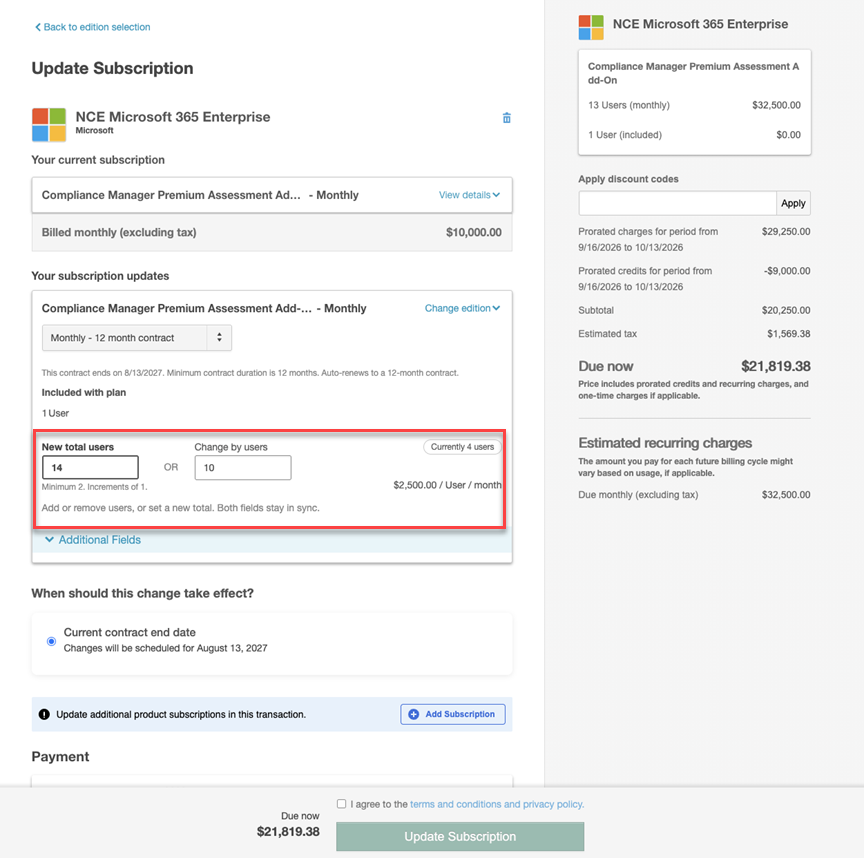
On the self-serve subscription update screen, each subscription update row includes:
-
The UI now displays the current number of users.
-
Two new fields have been added to support user count updates:
- New total users – Enter the revised total number of users after the change. For example, if there are currently 4 users and you want to add 6 more, enter 10.
- Change by users – Enter the number of users to add or remove. For example, enter 6 to add 6 users, or -2 to remove 2 users.
Feature enablement
This feature is not enabled by default. Contact your AppDirect technical representative to request access.
Setting enablement
No setting enablement is required.
Documentation
Documentation will be updated with the release.
Was this page helpful?
Tell us more…
Help us improve our content. Responses are anonymous.
Thanks
We appreciate your feedback!